t = sp.symbols('t', real=True)
P1 = sp.Matrix([-40, -20])
P2 = sp.Matrix([50, 80])
P_harbor = sp.Matrix([40, 50])
dir_vector = P2 - P1
P_T = P1 + t * dir_vector8.2 Computational Thinking
The Essence of Computational Thinking
Computational thinking is a fundamental methodology for solving problems by reformulating them in ways that enable systematic, step-by-step execution [1,2]. Rather than a programming technique, it represents a way of approaching problems in the computational age. The methodology rests on four interconnected practices: breaking problems into smaller subproblems (decomposition), representing physical systems as mathematical models (abstraction), expressing solutions as iterative procedures (algorithmic thinking), and exploring system behavior through step-by-step simulations (modeling and simulation). When analyzing a damped pendulum, we decompose the motion into force calculations and state updates at each time step, abstract the physical system as ordinary differential equations, design an algorithm that repeatedly computes and updates the system state, and run simulations to generate trajectories that reveal the pendulum’s behavior over time.
A Fundamental Shift, Not a Shortcut
This approach is not a shortcut but a fundamental shift in problem-solving methodology. Consider a pendulum swinging with air resistance at large angles: the governing nonlinear differential equation admits no closed-form solution in elementary functions. Traditional analytical methods reach an impasse, but computational thinking circumvents this entirely by treating the system as something to be simulated rather than solved symbolically [3]. The principle is simple: humans excel at modeling physical situations and interpreting results, while computers excel at rapid, tireless calculation. By delegating mechanical computation to machines, we tackle problems of complexity far beyond purely analytical methods.
Computational Thinking in Engineering: The Iterative Approach
In engineering and applied mathematics, computational thinking transforms continuous physical processes into discrete, iterative steps. This iterative process constitutes the algorithm that solves the problem.
A continuous process, such as the motion of an object over time, is decomposed into a sequence of small time steps \(\Delta t\). We recognize that the same physical laws apply at every step: the state at time \((t + \Delta t)\) is determined by the state at time \(t\). This repeating pattern enables an algorithmic solution through a loop that calculates state changes and updates the system until a desired condition is met. The system is encoded as update rules on state variables, and these rules execute repeatedly to generate a numerical trajectory for analysis and visualization.
An Engineering Example: A Pendulum with Air Resistance
A damped pendulum illustrates both the limitations of analytical methods and the strength of computational thinking. The governing differential equation \(mL\ddot{\theta} + cL\dot{\theta} + mg\sin(\theta) = 0\) is nonlinear due to the \(\sin(\theta)\) term, preventing closed-form solution for large angles. The computational approach bypasses this impasse by discretizing time into small steps \(\Delta t\) and treating angular acceleration as approximately constant over each step. At each time step, we calculate the angular acceleration \(\alpha = -(c/m)\dot{\theta} - (g/L)\sin(\theta)\) from the current state, update the angular velocity \(\omega_{\text{new}} = \omega + \alpha \Delta t\), and update the angle \(\theta_{\text{new}} = \theta + \omega_{\text{new}} \Delta t\). This iterative process generates a numerical trajectory that would otherwise be unobtainable, demonstrating how computational thinking provides solutions when traditional analytical techniques fail.
Intuition and Modularity: The Brake Pad Example
Beyond tackling analytically difficult problems, the computational approach often proves more intuitive. Consider calculating a car’s stopping distance when the brake pad friction coefficient \(\mu\) decreases with temperature. An analytical solution requires solving coupled integral-differential equations describing the feedback between energy dissipation, temperature, and braking force. The computational approach simply simulates cause and effect: at each time step, look up \(\mu\) from the current temperature, compute the braking force \(F = \mu F_{\text{normal}}\), calculate deceleration and distance traveled, convert work to heat, and update the temperature. Each line of code mirrors a physical process, making the model transparent and easily modified.
Applying Computational Thinking: A Practical Workflow
Computational thinking becomes a repeatable workflow structured as Formulate–Solve–Analyze. In the formulation phase, we translate real-world problems into mathematical and computational models by defining variables, coordinates, and governing principles. The solution phase delegates mechanical calculation to appropriate tools: symbolic algebra systems, numerical libraries, or custom time-stepping schemes. The analysis phase returns to human judgment: we visualize results through plots and animations, validate solutions by checking units and limiting cases, and interpret what the results reveal about system behavior. This workflow transforms computational thinking from an abstract concept into practical methodology.
Example 1 - boat navigation
Let the coordinates be in km. A boat is at point (-40, -20) and is headed toward the point (50, 80) with a speed of 10 km/h. Compute the point where the boat needs to make a \(60^\circ\) turn to continue in a straight line towards the harbor at the point (40, 50). How long will it take the boat to reach the harbor?
Formulation
We can solve this problem geometrically. Let the starting point be \(P_1 = (-40, -20)\), the initial heading point be \(P_2 = (50, 80)\), the harbor be \(P_H = (40, 50)\), and the unknown turning point be \(P_T = (x_t, y_t)\).
It’s always a good idea to sketch the situation to visualize the problem.
Code
P1 = np.array([-40, -20]) # Starting point
P2 = np.array([50, 80]) # Initial heading point
P_harbor = np.array([40, 50]) # Harbor (destination)
fig, ax = plt.subplots(figsize=(10, 8))
ax.grid(True)
dir_vector = P2 - P1
ax.plot(*zip(*[P1, P1 + dir_vector]),
'b--', linewidth=2, label='Initial heading direction')
P_turn_approx = P1 + dir_vector * 0.65
ax.plot([P_turn_approx[0], P_harbor[0]],
[P_turn_approx[1], P_harbor[1]],
'g--', linewidth=2, label='Path to harbor (after turn)')
ax.plot(P_turn_approx[0], P_turn_approx[1], 'mo', markersize=10,
label='Turning point: P_T (to be computed)')
ax.plot(P1[0], P1[1], 'go', markersize=12, label='Start: $P_1(-40, -20)$')
ax.plot(P2[0], P2[1], 'ro', markersize=10, alpha=0.6, label='Heading reference: $P_2(50, 80)$')
ax.plot(P_harbor[0], P_harbor[1], 'ks', markersize=12, label='Harbor: $P_H(40, 50)$')
ax.text(P1[0]+2, P1[1]-4, 'P1', fontsize=12)
ax.text(P2[0]+2, P2[1], 'P2', fontsize=12)
ax.text(P_harbor[0]+2, P_harbor[1]+2, 'PH', fontsize=12)
ax.text(P_turn_approx[0]-2, P_turn_approx[1]+2, 'PT', fontsize=12)
ax.legend()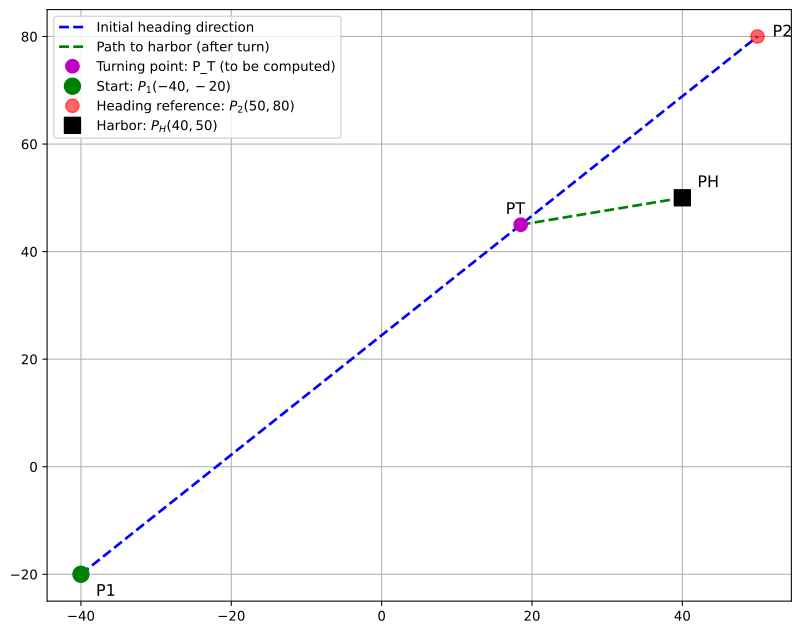
Here, we have drawn the known points and the trajectory of the boat. The unknown turning point \(P_T\) lies somewhere on the line segment between \(P_1\) and \(P_2\). We have modeled this turning point as 65% of the way from \(P_1\) to \(P_2\) just for illustration; the actual turning point will be computed below.
65% of the way from \(P_1\) to \(P_2\) is the same as starting at \(P_1\) and going 65% of the way along the vector \(P_2 - P_1\). We start simple: Let’s parameterize the turning point using the parameter \(t\) such that
\[ P_T = P_1 + t(P_2 - P_1) \]
But we also need to fulfill the \(60^\circ\) turn condition. Let \(\boldsymbol v_{1} = P_T - P_1\) and \(\boldsymbol v_{2} = P_H - P_T\). The angle between the vectors \(\boldsymbol v_{1}\) and \(\boldsymbol v_{2}\) must be \(60^\circ\). Using the dot product formula, we have:
\[ \boldsymbol{v_1} \cdot \boldsymbol{v_2} = \|\boldsymbol{v_1}\| \|\boldsymbol{v_2}\| \cos(60^\circ) \]
Once we solve for \(t\), we can compute the turning point \(P_T\). Finally, we can compute the total distance from \(P_1\) to \(P_T\) to \(P_H\) and divide by the speed to get the time taken. We can delegate the algebraic manipulation to SymPy.
Note
This formulation phase is crucial! It is often the hard part and where students get lost in computation. Do not start computing too early! Formulate a strategy first! Start with a sketch if applicable. Explicitly write down what you know and what you need to find. Identify the variables and parameters. Then formulate a plan to connect the knowns to the unknowns. Find equations that relate the variables. Only then start computing, starting with intial algebraic expansions using sympy. To grasp the problem, identifying unknowns and knowns, and writing down the equations is often more important than the final numerical answer. Do not rush into coding!
Always try to keep things symbolic as long as possible. Numerical values can be plugged in at the end.
\[ \boldsymbol P_T={\def\arraystretch{1.5}\left[\begin{matrix}90 t - 40\\100 t - 20\end{matrix}\right]} \]
v_1 = P2 - P1
v_2 = P_harbor - P_T
eq = sp.Eq(v_1.dot(v_2), v_1.norm() * v_2.norm() * sp.cos(60 * sp.pi / 180))
eq\(\displaystyle 14200 - 18100 t = 5 \sqrt{181} \sqrt{\left(90 t - 80\right)^{2} + \left(100 t - 70\right)^{2}}\)
sol = sp.solve(eq, t)
t_turn = sol[0]
t_turn.evalf()\(\displaystyle 0.730304118363405\)
P_turn = P1 + t_turn * dir_vector
P_turn.evalf()\(\displaystyle \left[\begin{matrix}25.7273706527065\\53.0304118363405\end{matrix}\right]\)
v = 10 # km/h
t_to_turn = (v_1.norm() / v).evalf() # hours to reach turning point
t_to_harbor = (v_2.norm() / v).subs(t,t_turn).evalf() # hours from turning point to harbor
t_total = t_to_turn + t_to_harbor
print(f"Time to turn: {t_to_turn:.2f} hours")
print(f"Time to harbor after turn: {t_to_harbor:.2f} hours")
print(f"Total time: {t_total:.2f} hours")Time to turn: 13.45 hours
Time to harbor after turn: 1.46 hours
Total time: 14.91 hoursVerification
Finally, we plot the trajectory to visually verify that our solution is correct. The plot should show the boat starting at \(P_1\), heading towards \(P_2\), making a turn at the calculated point \(P_T\), and then proceeding to the harbor \(P_H\). This confirms that our mathematical model and its solution accurately reflect the physical reality described in the problem.
Code
P1 = np.array([-40, -20]) # Starting point
P2 = np.array([50, 80]) # Initial heading point
P_harbor = np.array([40, 50]) # Harbor (destination)
fig, ax = plt.subplots(figsize=(10, 8))
ax.grid(True)
dir_vector = P2 - P1
ax.plot(*zip(*[P1, P1 + dir_vector]),
'b--', linewidth=2, label='Initial heading direction')
P_turn_exact = P_turn.evalf()
ax.plot([P_turn_exact[0], P_harbor[0]],
[P_turn_exact[1], P_harbor[1]],
'g--', linewidth=2, label='Path to harbor (after turn)')
ax.plot(P_turn_exact[0], P_turn_exact[1], 'mo', markersize=10,
label='Turning point: P_T (to be computed)')
ax.plot(P1[0], P1[1], 'go', markersize=12, label='Start: $P_1(-40, -20)$')
ax.plot(P2[0], P2[1], 'ro', markersize=10, alpha=0.6, label='Heading reference: $P_2(50, 80)$')
ax.plot(P_harbor[0], P_harbor[1], 'ks', markersize=12, label='Harbor: $P_H(40, 50)$')
ax.text(P1[0]+2, P1[1]-4, 'P1', fontsize=12)
ax.text(P2[0]+2, P2[1], 'P2', fontsize=12)
ax.text(P_harbor[0]+2, P_harbor[1]+2, 'PH', fontsize=12)
ax.text(P_turn_exact[0]-2, P_turn_exact[1]+2, 'PT', fontsize=12)
ax.legend()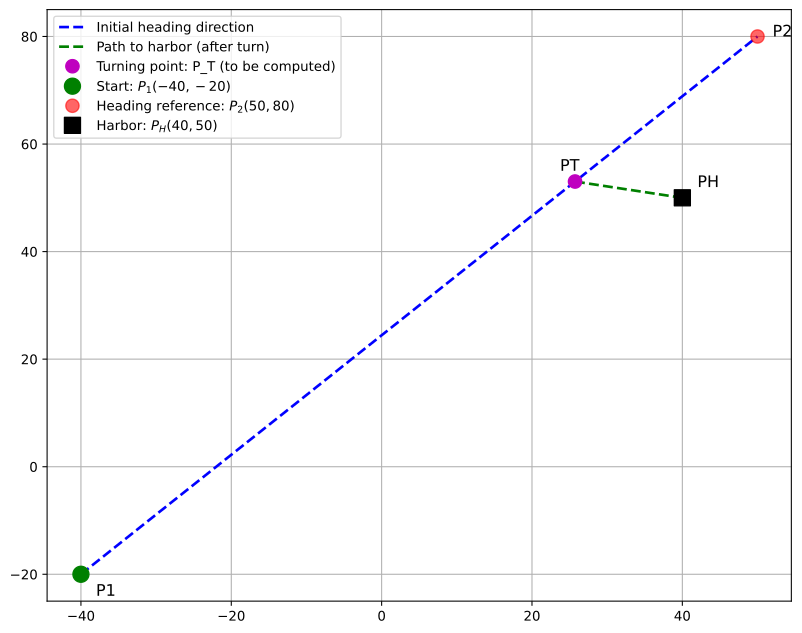
Example 2 - boat navigation with a current
Lets revisit example 1, but now assume that there is a current flowing in the positive x-direction at 5 km/h. We are instructed to keep the trajectory \(\overrightarrow{P_1P_2}\). Compute the point where the boat needs to make a \(60^\circ\) turn to continue in a straight line towards the harbor at the point (40, 50). How long will it take the boat to reach the harbor?
Formulation
Now there is a current in the positive x-direction at 5 km/h. This means that the boat’s velocity relative to the water must be adjusted to account for the current. The boat’s effective velocity vector \(\boldsymbol{v}_{\text{eff}}\) is the sum of its velocity vector \(\boldsymbol{v}_{\text{boat}}\) and the current vector \(\boldsymbol{v}_{\text{current}} = (5, 0)\) km/h.
The difference from Example 1 is that while we want the ground track to follow \(\overrightarrow{P_1P_2}\) (same as before), the boat must now steer in a different direction to compensate for the current.
On the first leg, let the ground velocity be \(\boldsymbol{v}_{\text{ground},1} = s_1 \boldsymbol{e}_1\) where \(\boldsymbol{e}_1\) is the unit vector along \(\overrightarrow{P_1P_2}\) and \(s_1\) is the unknown ground speed. The boat velocity satisfies:
\[\boldsymbol{v}_{\text{ground},1} = \boldsymbol{v}_{\text{boat},1} + \boldsymbol{v}_{\text{current}}\]
with the constraint \(\|\boldsymbol{v}_{\text{boat},1}\| = 10\) km/h. This allows us to solve for \(s_1\).
Let’s sketch the situation to visualize how the current affects the boat’s heading.
Code
# Sketch showing velocity triangle
P1 = np.array([-40, -20])
P2 = np.array([50, 80])
P_harbor = np.array([40, 50])
fig, ax = plt.subplots(1, 2, figsize=(14, 6))
# Left plot: Velocity triangle
ax[0].set_title('Velocity Triangle for Leg 1')
ax[0].set_aspect('equal')
ax[0].grid(True)
# Direction of desired ground track
dir_ground = (P2 - P1) / np.linalg.norm(P2 - P1)
# For illustration, assume some ground speed
v_ground_approx = 8 * dir_ground # Approximate
v_current = np.array([5, 0])
v_boat_approx = v_ground_approx - v_current
origin = np.array([0, 0])
scale = 1
# Draw velocity vectors from origin
ax[0].arrow(origin[0], origin[1], v_current[0]*scale, v_current[1]*scale,
head_width=0.3, head_length=0.3, fc='red', ec='red',
linewidth=2, label='$\\boldsymbol{v}_{\\mathrm{current}}$')
ax[0].arrow(origin[0], origin[1], v_boat_approx[0]*scale, v_boat_approx[1]*scale,
head_width=0.3, head_length=0.3, fc='blue', ec='blue',
linewidth=2, label='$\\boldsymbol{v}_{\\mathrm{boat}}$ (steering)')
ax[0].arrow(origin[0], origin[1], v_ground_approx[0]*scale, v_ground_approx[1]*scale,
head_width=0.3, head_length=0.3, fc='green', ec='green',
linewidth=2, label='$\\boldsymbol{v}_{\\mathrm{ground}}$ (actual path)')
# Draw the triangle
ax[0].plot([v_current[0]*scale, v_ground_approx[0]*scale],
[v_current[1]*scale, v_ground_approx[1]*scale],
'k--', alpha=0.3, linewidth=1)
ax[0].set_xlabel('x [km/h]')
ax[0].set_ylabel('y [km/h]')
ax[0].legend(loc='upper left')
ax[0].set_xlim(-5, 10)
ax[0].set_ylim(-2, 8)
# Right plot: Ground track
ax[1].set_title('Ground Track (Same as Example 1)')
ax[1].grid(True)
ax[1].set_aspect('equal')
# Show the desired ground track
ax[1].plot([P1[0], P2[0]], [P1[1], P2[1]],
'g--', linewidth=2, alpha=0.6, label='Desired ground track direction')
# Show points
ax[1].plot(P1[0], P1[1], 'go', markersize=12, label='Start: $P_1$')
ax[1].plot(P2[0], P2[1], 'ro', markersize=10, alpha=0.6, label='Reference: $P_2$')
ax[1].plot(P_harbor[0], P_harbor[1], 'ks', markersize=12, label='Harbor: $P_H$')
# Approximate turning point
P_turn_approx = P1 + 0.65 * (P2 - P1)
ax[1].plot(P_turn_approx[0], P_turn_approx[1], 'mo', markersize=10,
label='Turning point (to be computed)')
ax[1].plot([P_turn_approx[0], P_harbor[0]], [P_turn_approx[1], P_harbor[1]],
'g--', linewidth=2, alpha=0.6)
ax[1].set_xlabel('x [km]')
ax[1].set_ylabel('y [km]')
ax[1].legend(loc='upper left')
plt.tight_layout()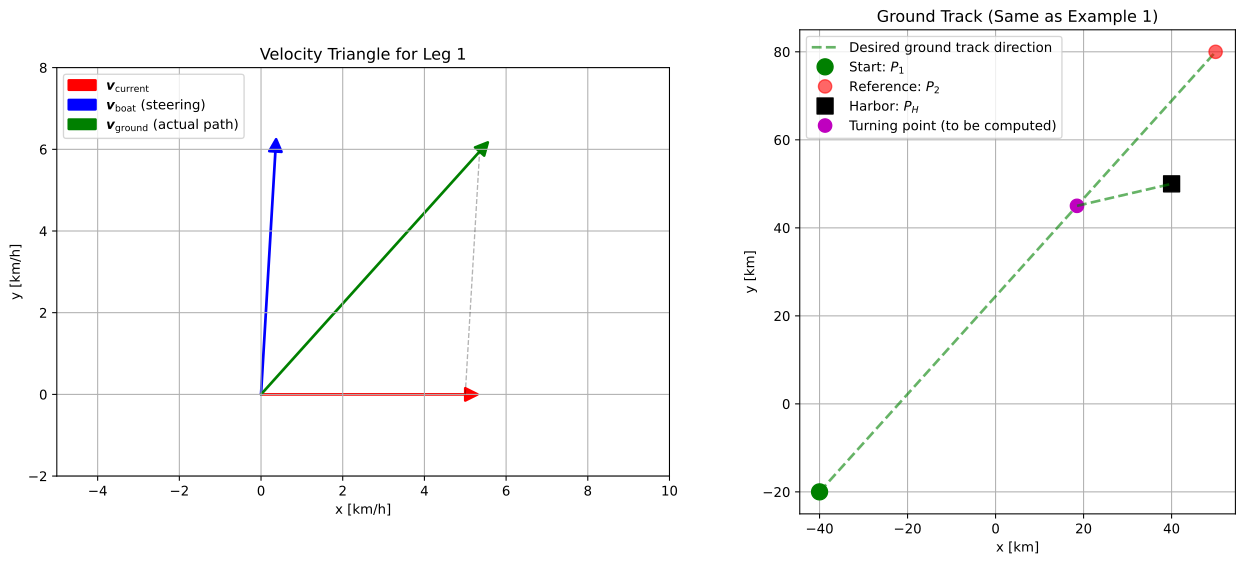
# Define symbolic variables
s1, t1 = sp.symbols('s_1 t_1', real=True, positive=True)
# Known quantities
P1 = sp.Matrix([-40, -20])
P2 = sp.Matrix([50, 80])
P_H = sp.Matrix([40, 50])
v_current = sp.Matrix([5, 0])
v_boat_speed = 10 # km/h
# Direction unit vector for first leg (along P1 to P2)
e1 = (P2 - P1).normalized()
# Leg 1: Ground velocity along e1
v_ground_1 = s1 * e1
v_boat_1 = v_ground_1 - v_current
# Turning point
P_T = P1 + t1 * v_ground_1
P_T\(\displaystyle \left[\begin{matrix}\frac{9 \sqrt{181} s_{1} t_{1}}{181} - 40\\\frac{10 \sqrt{181} s_{1} t_{1}}{181} - 20\end{matrix}\right]\)
v_ground_1\(\displaystyle \left[\begin{matrix}\frac{9 \sqrt{181} s_{1}}{181}\\\frac{10 \sqrt{181} s_{1}}{181}\end{matrix}\right]\)
v_boat_1\(\displaystyle \left[\begin{matrix}\frac{9 \sqrt{181} s_{1}}{181} - 5\\\frac{10 \sqrt{181} s_{1}}{181}\end{matrix}\right]\)
We need to satisfy: \(|\boldsymbol{v}_{\text{boat},1}| = 10\)
# Constraint 1: Boat speed on leg 1
eq1 = sp.Eq(v_boat_1.norm(), v_boat_speed)
eq1\(\displaystyle \sqrt{\frac{100 s_{1}^{2}}{181} + \left(\frac{9 \sqrt{181} s_{1}}{181} - 5\right)^{2}} = 10\)
From this we can solve for \(s_1\).
# Solve for s1
sol_s1 = sp.solve(eq1, s1)
print(f"Solutions for s1: {len(sol_s1)} found")
for i, s in enumerate(sol_s1):
print(f"s1[{i}] = {s.evalf():.4f} km/h")Solutions for s1: 1 found
s1[0] = 12.6286 km/hv_ground_1 = v_ground_1.subs(s1, sol_s1[0].evalf()).evalf()
v_ground_1\(\displaystyle \left[\begin{matrix}8.44806430779951\\9.38673811977723\end{matrix}\right]\)
The turning point is \(P_T = P_1 + t_1 \boldsymbol{v}_{\text{ground},1} = P_1 + t_1 s_1 \boldsymbol{e}_1\).
P_T = P1 + t1 * v_ground_1
P_T = P_T.subs(s1, sol_s1[0].evalf())
P_T\(\displaystyle \left[\begin{matrix}8.44806430779951 t_{1} - 40\\9.38673811977723 t_{1} - 20\end{matrix}\right]\)
For leg 2 we have the ground velocity \(\boldsymbol{v}_{\text{ground},2} = s_2 \boldsymbol{e}_2\) where \(\boldsymbol{e}_2\) is the unit vector along \(\overrightarrow{P_T P_H}\) and \(s_2\) is the unknown ground speed. The boat velocity satisfies:
\[\boldsymbol{v}_{\text{ground},2} = \boldsymbol{v}_{\text{boat},2} + \boldsymbol{v}_{\text{current}}\]
\[ \boldsymbol{v}_{\text{boat},2} = \boldsymbol{v}_{\text{ground},2} - \boldsymbol{v}_{\text{current}} \]
# Leg 2: Ground velocity points toward harbor
s2 = sp.symbols('s_2', real=True, positive=True)
e2 = (P_H - P_T).normalized()
v_ground_2 = s2 * e2
v_boat_2 = v_ground_2 - v_current
v_boat_2\(\displaystyle \left[\begin{matrix}\frac{s_{2} \left(80 - 8.44806430779951 t_{1}\right)}{\sqrt{\left(8.44806430779951 t_{1} - 80\right)^{2} + \left(9.38673811977723 t_{1} - 70\right)^{2}}} - 5\\\frac{s_{2} \left(70 - 9.38673811977723 t_{1}\right)}{\sqrt{\left(8.44806430779951 t_{1} - 80\right)^{2} + \left(9.38673811977723 t_{1} - 70\right)^{2}}}\end{matrix}\right]\)
\[ |\boldsymbol{v}_{\text{boat},2}| = \sqrt{\boldsymbol{v}_{\text{boat},2} \cdot \boldsymbol{v}_{\text{boat},2}}= 10 \]
eq2 = sp.Eq(sp.sqrt(v_boat_2.dot(v_boat_2)), v_boat_speed)
eq2\(\displaystyle \sqrt{\frac{s_{2}^{2} \left(70 - 9.38673811977723 t_{1}\right)^{2}}{\left(8.44806430779951 t_{1} - 80\right)^{2} + \left(9.38673811977723 t_{1} - 70\right)^{2}} + \left(\frac{s_{2} \left(80 - 8.44806430779951 t_{1}\right)}{\sqrt{\left(8.44806430779951 t_{1} - 80\right)^{2} + \left(9.38673811977723 t_{1} - 70\right)^{2}}} - 5\right)^{2}} = 10\)
\[ \boldsymbol{v}_{\text{ground},1} \cdot \boldsymbol{v}_{\text{ground},2} = |\boldsymbol{v}_{\text{ground},1}| |\boldsymbol{v}_{\text{ground},2}| \cos(60^\circ) \]
eq3 = sp.Eq(v_ground_1.dot(v_ground_2),
v_ground_1.norm() * v_ground_2.norm() * sp.cos(60 * sp.pi / 180))
eq3\(\displaystyle \frac{9.38673811977723 s_{2} \left(70 - 9.38673811977723 t_{1}\right)}{\sqrt{\left(8.44806430779951 t_{1} - 80\right)^{2} + \left(9.38673811977723 t_{1} - 70\right)^{2}}} + \frac{8.44806430779951 s_{2} \left(80 - 8.44806430779951 t_{1}\right)}{\sqrt{\left(8.44806430779951 t_{1} - 80\right)^{2} + \left(9.38673811977723 t_{1} - 70\right)^{2}}} = 6.31428228459092 \sqrt{\frac{s_{2}^{2} \left(8.44806430779951 t_{1} - 80\right)^{2}}{\left(8.44806430779951 t_{1} - 80\right)^{2} + \left(9.38673811977723 t_{1} - 70\right)^{2}} + \frac{s_{2}^{2} \left(9.38673811977723 t_{1} - 70\right)^{2}}{\left(8.44806430779951 t_{1} - 80\right)^{2} + \left(9.38673811977723 t_{1} - 70\right)^{2}}}\)
Now we have two equations with two unknowns (\(t_1\) and \(s_2\)). However, these equations involve normalized vectors and are highly nonlinear. Attempting symbolic solving with sp.solve takes too long time, does not find a solution or produces huge output (try it!). Instead, we use numerical solving with sp.nsolve
Important
Notice that s2, t1 = sp.nsolve([eq2, eq3], (s2, t1), (s2_guess, t1_guess)) requires initial guesses for the unknowns. Good initial guesses are important for convergence of numerical solvers. Often one can use the domain knowledge to make good guesses for the inital values. We notice how the values are sensitive to the initial guesses. Choosing bad initial guesses may lead to divergence or convergence to wrong solutions. This is a common issue with numerical solvers. We deal with this by checking if the results are in a feasable region, e.g., positive and less than the total distance between \(P_1\) and \(P_2\) and adjusting the initial guesses as needed.
s2, t1 = sp.symbols('s_2 t_1', real=True, positive=True)
s2_solution, t1_solution = sp.nsolve([eq2, eq3], (s2, t1), (10, 5))
print(f"s2 = {s2_solution:.4f} km/h")
print(f"t1 = {t1_solution:.4f} hours")s2 = 14.8369 km/h
t1 = 7.7802 hoursAnother way is to scipy.optimize.fsolve, which is a purely numerical method, that does not depend on symbolic manipulation. This is often more robust for highly nonlinear problems.
import scipy.optimize as opt
# Convert SymPy equations to numerical functions
def equations(vars):
t1_val, s2_val = vars
# Substitute numerical values into the symbolic equations
eq2_num = float(eq2.lhs.subs([(t1, t1_val), (s2, s2_val)]).evalf()) - 10
eq3_lhs = float(eq3.lhs.subs([(t1, t1_val), (s2, s2_val)]).evalf())
eq3_rhs = float(eq3.rhs.subs([(t1, t1_val), (s2, s2_val)]).evalf())
eq3_num = eq3_lhs - eq3_rhs
return [eq2_num, eq3_num]
# Initial guess
# t1 , s2
initial_guess = [5.0, 10.0]
# Solve numerically
print("Solving system numerically...")
solution = opt.fsolve(equations, initial_guess)
t1_solution, s2_solution = solution
print(f"\nNumerical solution:")
print(f"t1 = {t1_solution:.4f} hours")
print(f"s2 = {s2_solution:.4f} km/h")
# Verify the solution
residuals = equations(solution)
print(f"\nResiduals (should be close to zero):")
print(f"eq2 residual: {residuals[0]:.2e}")
print(f"eq3 residual: {residuals[1]:.2e}")Solving system numerically...
Numerical solution:
t1 = 7.7802 hours
s2 = 14.8369 km/h
Residuals (should be close to zero):
eq2 residual: 1.42e-14
eq3 residual: -1.12e-12# Compute the turning point
P_T_solution = P_T.subs(t1, t1_solution)
print("Turning point coordinates:")
print(f"P_T = ({float(P_T_solution[0].evalf()):.2f}, {float(P_T_solution[1].evalf()):.2f}) km")
# Compute distance and time on second leg
dist_2 = float((P_H - P_T_solution).norm().evalf())
t2_solution = dist_2 / s2_solution
print(f"\nDistance on second leg: {dist_2:.2f} km")
print(f"Time on second leg: t2 = {t2_solution:.4f} hours")
# Total time
t_total = t1_solution + t2_solution
print(f"\nTotal time to harbor: {t_total:.2f} hours")
# Compare with Example 1
print(f"\nComparison with Example 1 (no current):")
print(f" Example 1 total time: 14.91 hours")
print(f" Example 2 total time: {t_total:.2f} hours")
print(f" Difference: {(t_total - 14.91):.2f} hours")Turning point coordinates:
P_T = (25.73, 53.03) km
Distance on second leg: 14.59 km
Time on second leg: t2 = 0.9834 hours
Total time to harbor: 8.76 hours
Comparison with Example 1 (no current):
Example 1 total time: 14.91 hours
Example 2 total time: 8.76 hours
Difference: -6.15 hoursVerification
We plot the results to visualize the solution. The plot shows the ground track (green), the boat’s steering direction (blue dashed), and the velocity triangle illustrating how the current affects navigation.
Code
# Convert to numerical values for plotting
P1_num = np.array([-40, -20])
P2_num = np.array([50, 80])
P_H_num = np.array([40, 50])
v_current_num = np.array([5, 0])
s1_num = float(sol_s1[0].evalf())
# Compute turning point
e1_num = (P2_num - P1_num) / np.linalg.norm(P2_num - P1_num)
P_T_num = P1_num + t1_solution * s1_num * e1_num
# Compute velocities
v_ground_1_num = s1_num * e1_num
v_boat_1_num = v_ground_1_num - v_current_num
e2_num = (P_H_num - P_T_num) / np.linalg.norm(P_H_num - P_T_num)
v_ground_2_num = s2_solution * e2_num
v_boat_2_num = v_ground_2_num - v_current_num
fig, ax = plt.subplots(figsize=(12, 9))
ax.grid(True)
ax.set_aspect('equal')
# Plot the ground track (actual path)
ax.plot([P1_num[0], P_T_num[0]], [P1_num[1], P_T_num[1]],
'g-', linewidth=3, label='Ground track (actual path)', zorder=3)
ax.plot([P_T_num[0], P_H_num[0]], [P_T_num[1], P_H_num[1]],
'g-', linewidth=3, zorder=3)
# Plot steering directions (boat heading relative to water)
steering_end_1 = P1_num + v_boat_1_num * t1_solution
ax.plot([P1_num[0], steering_end_1[0]], [P1_num[1], steering_end_1[1]],
'b--', linewidth=2, alpha=0.7, label='Boat heading (steering direction)', zorder=2)
steering_end_2 = P_T_num + v_boat_2_num * t2_solution
ax.plot([P_T_num[0], steering_end_2[0]], [P_T_num[1], steering_end_2[1]],
'b--', linewidth=2, alpha=0.7, zorder=2)
# Plot the reference line P1-P2
ax.plot([P1_num[0], P2_num[0]], [P1_num[1], P2_num[1]],
'r:', linewidth=1.5, alpha=0.5, label='Reference direction $\\overrightarrow{P_1P_2}$', zorder=1)
# Plot velocity vectors at starting point (scaled for visibility)
scale_v = 3
origin_v = P1_num + np.array([-15, -10]) # Offset for clarity
ax.arrow(origin_v[0], origin_v[1], v_boat_1_num[0]*scale_v, v_boat_1_num[1]*scale_v,
head_width=2, head_length=1.5, fc='blue', ec='blue',
linewidth=1.5, alpha=0.7)
ax.arrow(origin_v[0], origin_v[1], v_current_num[0]*scale_v, v_current_num[1]*scale_v,
head_width=2, head_length=1.5, fc='red', ec='red',
linewidth=1.5, alpha=0.7)
ax.arrow(origin_v[0], origin_v[1], v_ground_1_num[0]*scale_v, v_ground_1_num[1]*scale_v,
head_width=2, head_length=1.5, fc='green', ec='green',
linewidth=2, alpha=0.8)
ax.text(origin_v[0]-3, origin_v[1]-3, 'Velocity\ntriangle', fontsize=9, ha='right')
# Plot points
ax.plot(P1_num[0], P1_num[1], 'go', markersize=14, label='Start: $P_1$', zorder=4)
ax.plot(P2_num[0], P2_num[1], 'ro', markersize=11, alpha=0.7, label='Reference: $P_2$', zorder=4)
ax.plot(P_H_num[0], P_H_num[1], 'ks', markersize=14, label='Harbor: $P_H$', zorder=4)
ax.plot(P_T_num[0], P_T_num[1], 'mo', markersize=12, label='Turning point: $P_T$', zorder=4)
# Add labels
ax.text(P1_num[0]+2, P1_num[1]-5, '$P_1$', fontsize=13, fontweight='bold')
ax.text(P2_num[0]+2, P2_num[1]+2, '$P_2$', fontsize=13, fontweight='bold')
ax.text(P_H_num[0]+2, P_H_num[1]+2, '$P_H$', fontsize=13, fontweight='bold')
ax.text(P_T_num[0]-3, P_T_num[1]+3, '$P_T$', fontsize=13, fontweight='bold')
# Add crab angle annotation
mid_point = P1_num + 0.3 * (P_T_num - P1_num)
ax.annotate('Crab angle\n(heading ≠ track)',
xy=mid_point, xytext=(mid_point[0]-15, mid_point[1]+10),
arrowprops=dict(arrowstyle='->', lw=1, color='gray'),
fontsize=10, ha='center')
ax.set_xlabel('x [km]', fontsize=12)
ax.set_ylabel('y [km]', fontsize=12)
ax.set_title('Boat Navigation with Current: Maintaining Ground Track $\\overrightarrow{P_1P_2}$',
fontsize=13, fontweight='bold')
ax.legend(loc='upper left', fontsize=10)
plt.tight_layout()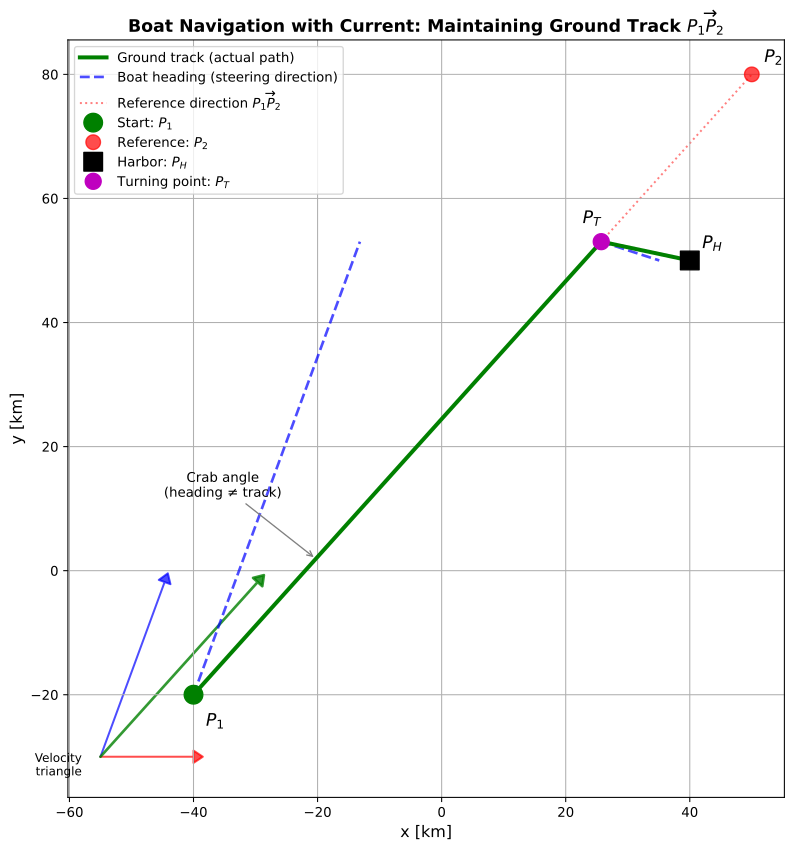
The plot reveals the crucial distinction between steering direction and ground track when navigating in a current. The green solid line shows the boat’s actual path over the ground, which we intentionally maintain along \(\overrightarrow{P_1P_2}\) (shown as the red dotted line) to follow the same route as Example 1. The blue dashed lines show where the boat must actually point (steering direction relative to the water) to achieve this ground track.
The velocity triangle inset illustrates the vector addition: the boat’s velocity through the water (blue) plus the current (red) equals the ground velocity (green). Notice how the boat must “aim upstream” (point slightly against the current) to maintain its desired course.
Compared to Example 1, the current affects both the travel time and the turning point location. The boat’s ground speed changes because it must compensate for the lateral drift. This problem demonstrates a fundamental principle in navigation: maintaining a desired ground track in the presence of a current requires continuous compensation in steering direction, an effect quantified by the crab angle.
Important
When symbolic solving with sp.solve produces enormous expressions or fails entirely (as it did here due to complex normalized vector equations), numerical methods like sp.nsolve or scipy.optimize.fsolve provide a robust alternative. The trade-off is that we must provide reasonable initial guesses, but the solution is fast and accurate for practical engineering purposes.
Example 3 - boat navigation with a bad navigation system
A boat starts at point \(P_1 = (-40, -20)\) and wants to reach the harbor at \(P_H = (40, 50)\). The boat travels at 10 km/h through the water, and there is a current of 5 km/h in the positive x-direction. Unlike Examples 1 and 2, the boat cannot plan its path in advance. Instead, it uses a simple autopilot that continuously adjusts the heading to steer toward the harbor based on its current position. The autopilot applies a proportional controller: when the boat drifts off the straight-line path from its current position to the harbor, it applies a steering correction proportional to the perpendicular distance (cross-track error) from that line.
Simulate the boat’s trajectory and determine the path taken and time to reach the harbor.
Formulation: The Iterative Approach
Unlike Examples 1 and 2, this problem cannot be solved by writing down equations and solving them symbolically or numerically. The boat’s heading changes continuously in response to its position, which itself changes due to the heading - a circular dependency that creates a feedback loop. This is precisely the situation where the iterative time-stepping approach becomes essential.
We discretize time into small steps \(\Delta t\) and recognize that the same control logic applies at every step:
State variables: At each time \(t\), the boat has a position \(\boldsymbol{P}(t) = (x(t), y(t))\) and a heading direction \(\boldsymbol{h}(t)\).
Desired path: The straight line from the current position to the harbor.
Cross-track error: The perpendicular distance \(e_{\perp}\) from the boat’s current position to the desired path.
Control law: The autopilot computes a desired heading toward the harbor, then applies a correction proportional to the cross-track error: \[\boldsymbol{h}_{\text{desired}} = \frac{\boldsymbol{P}_H - \boldsymbol{P}(t)}{\|\boldsymbol{P}_H - \boldsymbol{P}(t)\|} + K \cdot e_{\perp} \cdot \boldsymbol{n}_{\perp}\] where \(K\) is the proportional gain and \(\boldsymbol{n}_{\perp}\) is the unit vector perpendicular to the desired path.
Velocity update: The boat steers in direction \(\boldsymbol{h}_{\text{desired}}\) at 10 km/h through the water, and the current adds \((5, 0)\) km/h to produce the ground velocity.
Position update: \(\boldsymbol{P}(t + \Delta t) = \boldsymbol{P}(t) + \boldsymbol{v}_{\text{ground}} \cdot \Delta t\)
Termination: Stop when \(\|\boldsymbol{P}_H - \boldsymbol{P}(t)\| < \epsilon\) for some small tolerance \(\epsilon\).
This algorithm embodies the essence of computational thinking in engineering: we break continuous motion into discrete time steps, encode the physical laws (kinematics + control) as update rules, and simulate the system’s evolution through repeated application of these rules.
Implementation: Time-Stepping Simulation
We implement the iterative algorithm described above. The simulation loop continues until the boat reaches the harbor within a tolerance of 0.5 km.
Code
def normalize(v):
norm = np.linalg.norm(v)
if norm == 0:
return v
return v / normCode
def RotateVector(v, angle_rad):
"""Rotate vector v by angle_rad counterclockwise."""
c, s = np.cos(angle_rad), np.sin(angle_rad)
R = np.array([[c, -s],
[s, c]])
return R @ v# Problem parameters
P_start = np.array([-40.0, -20.0]) # Starting position (km)
P_harbor = np.array([40.0, 50.0]) # Harbor position (km)
v_boat = 10.0 # Boat speed through water (km/h)
v_current = np.array([5.0, 0.0]) # Current velocity (km/h)
K_gain = 0.2 # Proportional control gain
dt = 0.05 # Time step (hours) = 3 minutes
tolerance = 0.5 # Stop when within this distance (km)
# Initialize state variables
P = P_start.copy() # Current position
t = 0.0 # Current time
# Storage for trajectory
trajectory = [P.copy()]
times = [t]
cross_track_errors = []
headings = []
# Desired straight-line path from start to harbor
path_vector = P_harbor - P_start
path_direction = normalize(path_vector)
path_perpendicular = RotateVector(path_direction, 90 * np.pi / 180) # counterclockwise 90 degrees
print("Starting simulation...")
print(f"Initial position: ({P[0]:.2f}, {P[1]:.2f})")
print(f"Harbor position: ({P_harbor[0]:.2f}, {P_harbor[1]:.2f})")
print(f"Distance to harbor: {np.linalg.norm(P_harbor - P_start):.2f} km\n")
# Time-stepping loop: the core of the iterative approach
iteration = 0
while np.linalg.norm(P_harbor - P) > tolerance:
# Compute direction to harbor from current position
to_harbor = P_harbor - P
distance_to_harbor = np.linalg.norm(to_harbor)
direction_to_harbor = to_harbor / distance_to_harbor
# Compute cross-track error: perpendicular distance from desired path
# (using the original path from start to harbor)
displacement_from_start = P - P_start
cross_track_error = np.dot(displacement_from_start, path_perpendicular)
cross_track_errors.append(cross_track_error)
# Control law: steer toward harbor with correction for cross-track error
heading_correction = -K_gain * cross_track_error * path_perpendicular
h_desired = direction_to_harbor + heading_correction
h_desired = h_desired / np.linalg.norm(h_desired) # Normalize
headings.append(np.arctan2(h_desired[1], h_desired[0]) * 180 / np.pi)
# Compute velocities
v_boat_vec = v_boat * h_desired # Boat velocity through water
v_ground = v_boat_vec + v_current # Ground velocity (boat + current)
# Update position
P = P + v_ground * dt
t = t + dt
# Store trajectory
trajectory.append(P.copy())
times.append(t)
iteration += 1
# Safety check to prevent infinite loops
if iteration > 10000:
print("Warning: Maximum iterations reached")
break
trajectory = np.array(trajectory)
times = np.array(times)
cross_track_errors = np.array(cross_track_errors)
print(f"Simulation complete!")
print(f"Final position: ({P[0]:.2f}, {P[1]:.2f})")
print(f"Distance to harbor: {np.linalg.norm(P_harbor - P):.2f} km")
print(f"Total time: {t:.2f} hours ({t*60:.1f} minutes)")
print(f"Number of time steps: {iteration}")
print(f"Actual path length: {np.sum(np.linalg.norm(np.diff(trajectory, axis=0), axis=1)):.2f} km")Starting simulation...
Initial position: (-40.00, -20.00)
Harbor position: (40.00, 50.00)
Distance to harbor: 106.30 km
Simulation complete!
Final position: (40.16, 49.61)
Distance to harbor: 0.42 km
Total time: 8.05 hours (483.0 minutes)
Number of time steps: 161
Actual path length: 106.34 kmVerification: Visualizing the Iterative Solution
We visualize the boat’s trajectory and how the control system responds to disturbances. The plots reveal how the iterative approach generates a solution that would be impossible to obtain analytically.
Code
fig, axes = plt.subplots(2, 1, figsize=(8, 14))
# Left plot: Trajectory
ax = axes[0]
ax.set_aspect('equal')
ax.grid(True, alpha=0.3)
# Plot the desired straight-line path
ax.plot([P_start[0], P_harbor[0]], [P_start[1], P_harbor[1]],
'k--', linewidth=2, alpha=0.4, label='Direct path (no current)')
# Plot the actual trajectory
ax.plot(trajectory[:, 0], trajectory[:, 1],
'b-', linewidth=2.5, label='Actual trajectory', zorder=3)
# Color the trajectory by time to show progression
scatter = ax.scatter(trajectory[::20, 0], trajectory[::20, 1],
c=times[::20], cmap='viridis', s=30, zorder=4,
edgecolors='black', linewidth=0.5)
cbar = plt.colorbar(scatter, ax=ax, label='Time (hours)')
# Mark start and harbor
ax.plot(P_start[0], P_start[1], 'go', markersize=14,
label=f'Start: $P_1$({P_start[0]:.0f}, {P_start[1]:.0f})', zorder=5)
ax.plot(P_harbor[0], P_harbor[1], 'rs', markersize=14,
label=f'Harbor: $P_H$({P_harbor[0]:.0f}, {P_harbor[1]:.0f})', zorder=5)
# Add velocity vector arrows at a few points
for i in range(0, len(trajectory)-1, max(1, len(trajectory)//8)):
pos = trajectory[i]
vel = (trajectory[i+1] - trajectory[i]) / dt
# Scale arrow for visibility
arrow_scale = 3
ax.arrow(pos[0], pos[1], vel[0]*arrow_scale, vel[1]*arrow_scale,
head_width=2, head_length=1.5, fc='red', ec='red',
alpha=0.5, linewidth=1, zorder=2)
ax.text(P_start[0]+3, P_start[1]-4, '$P_1$', fontsize=13, fontweight='bold')
ax.text(P_harbor[0]+3, P_harbor[1]+2, '$P_H$', fontsize=13, fontweight='bold')
# Add current indicator
ax.arrow(-30, -30, 15, 0, head_width=3, head_length=2,
fc='cyan', ec='cyan', alpha=0.7, linewidth=2)
ax.text(-22, -35, 'Current: 5 km/h', fontsize=10, ha='center',
bbox=dict(boxstyle='round', facecolor='cyan', alpha=0.3))
ax.set_xlabel('x [km]', fontsize=12)
ax.set_ylabel('y [km]', fontsize=12)
ax.set_title('Boat Trajectory with Proportional Control', fontsize=13, fontweight='bold')
ax.legend(loc='upper left', fontsize=9)
# Right plot: Cross-track error and heading over time
ax2 = axes[1]
ax2_twin = ax2.twinx()
# Plot cross-track error
line1 = ax2.plot(times[:-1], cross_track_errors, 'b-', linewidth=2,
label='Cross-track error')
ax2.axhline(y=0, color='k', linestyle='--', alpha=0.3, linewidth=1)
ax2.set_xlabel('Time (hours)', fontsize=12)
ax2.set_ylabel('Cross-track error (km)', fontsize=12, color='b')
ax2.tick_params(axis='y', labelcolor='b')
ax2.grid(True, alpha=0.3)
# Plot heading angle
line2 = ax2_twin.plot(times[:-1], headings, 'r-', linewidth=1.5, alpha=0.7,
label='Heading angle')
ax2_twin.set_ylabel('Heading angle (degrees)', fontsize=12, color='r')
ax2_twin.tick_params(axis='y', labelcolor='r')
# Combine legends
lines = line1 + line2
labels = [l.get_label() for l in lines]
ax2.legend(lines, labels, loc='upper right', fontsize=10)
ax2.set_title('Control System Response', fontsize=13, fontweight='bold')
plt.tight_layout()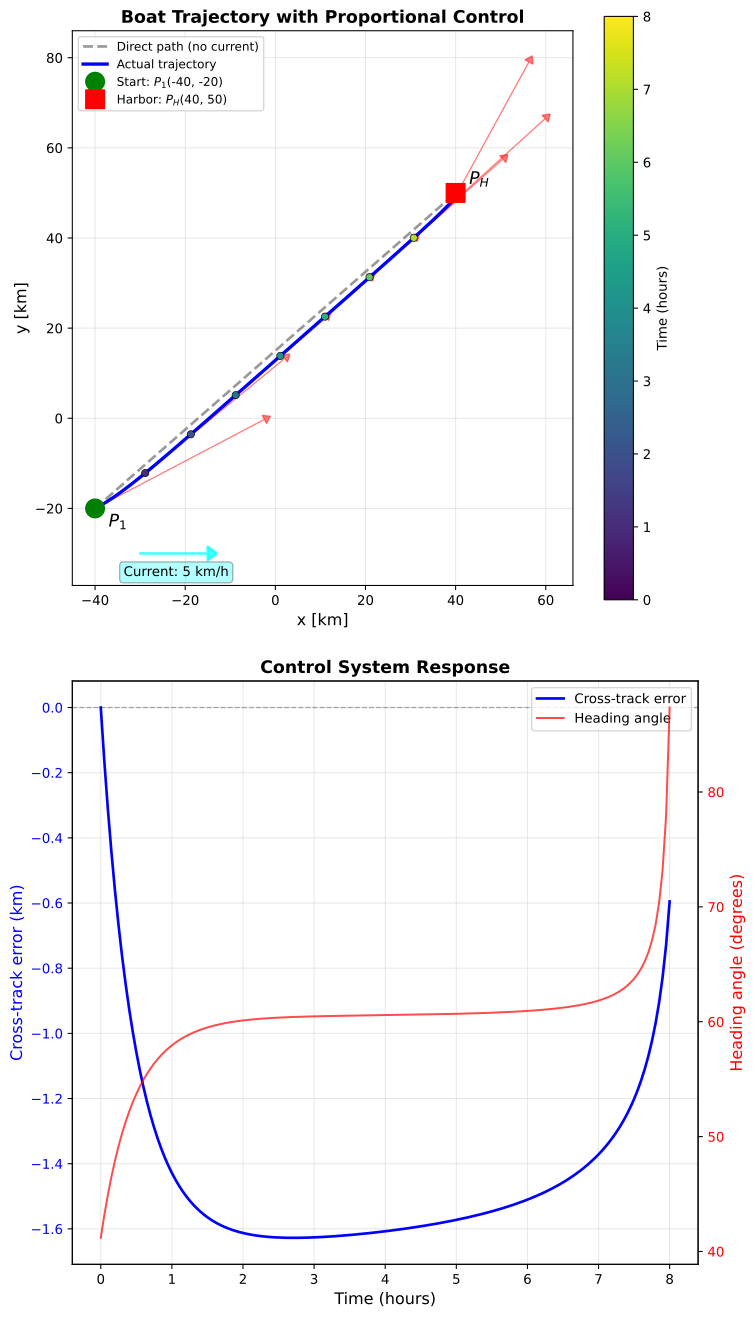
Animated Trajectory: The Iterative Process in Motion
To truly appreciate the iterative time-stepping approach, we create an animation showing the boat’s position evolving step-by-step. Each frame represents one time step \(\Delta t\), revealing how the same control rules applied repeatedly generate the complete trajectory.
Code
from matplotlib.animation import FuncAnimation
from IPython.display import HTML
import matplotlib
matplotlib.rcParams['animation.embed_limit'] = 50
from matplotlib.colors import to_rgba
# Select frames to display (reduce to avoid call stack issues in Quarto)
# Show only 50 frames total for compatibility
frame_skip = max(1, len(trajectory) // 50)
frame_indices = list(range(0, len(trajectory), frame_skip))
def animate_trajectory(frame_idx):
"""Animation function showing boat position at each time step"""
ax.clear()
i = frame_indices[frame_idx]
current_pos = trajectory[i]
current_time = times[i]
# Plot the desired straight-line path
ax.plot([P_start[0], P_harbor[0]], [P_start[1], P_harbor[1]],
'k--', linewidth=2, alpha=0.3, label='Direct path', zorder=1)
# Plot trajectory so far (fading trail effect)
if i > 0:
# Recent trajectory in bright color
recent_start = max(0, i - 40)
ax.plot(trajectory[recent_start:i+1, 0], trajectory[recent_start:i+1, 1],
'b-', linewidth=3, alpha=1.0, zorder=3)
# Older trajectory in faded color
if recent_start > 0:
ax.plot(trajectory[:recent_start, 0], trajectory[:recent_start, 1],
'b-', linewidth=2, alpha=0.3, zorder=2)
# Current boat position (larger marker)
ax.plot(current_pos[0], current_pos[1], 'bo', markersize=8,
markeredgecolor='darkblue', markeredgewidth=2, zorder=5)
# Mark start and harbor
ax.plot(P_start[0], P_start[1], 'go', markersize=12,
label='Start', zorder=4, alpha=0.7)
ax.plot(P_harbor[0], P_harbor[1], 'rs', markersize=12,
label='Harbor', zorder=4, alpha=0.7)
# Draw current heading vector
if i < len(trajectory) - 1:
vel = (trajectory[i+1] - trajectory[i]) / dt
arrow_scale = 4
ax.arrow(current_pos[0], current_pos[1],
vel[0]*arrow_scale, vel[1]*arrow_scale,
head_width=2.5, head_length=2, fc='red', ec='darkred',
linewidth=2, zorder=6, alpha=0.8,
label='Velocity vector' if frame_idx == 0 else '')
# Draw cross-track error as perpendicular line
if i < len(cross_track_errors):
cte = cross_track_errors[i]
# Find point on desired path
displacement = current_pos - P_start
along_path = np.dot(displacement, path_direction)
point_on_path = P_start + along_path * path_direction
# Draw error line
if abs(cte) > 0.1: # Only draw if significant
ax.plot([current_pos[0], point_on_path[0]],
[current_pos[1], point_on_path[1]],
'orange', linewidth=2, linestyle='--', alpha=0.7, zorder=4)
# Add error label
mid_error = (current_pos + point_on_path) / 2
ax.text(mid_error[0]+8, mid_error[1]-5, f'{cte:.1f} km',
fontsize=9, ha='center',
bbox=dict(boxstyle='round,pad=0.3', facecolor='yellow', alpha=0.7))
# Current indicator
ax.arrow(-30, -30, 15, 0, head_width=3, head_length=2,
fc='cyan', ec='cyan', alpha=0.5, linewidth=2, zorder=1)
ax.text(-22, -35, '5 km/h', fontsize=9, ha='center',
bbox=dict(boxstyle='round', facecolor='cyan', alpha=0.3))
# Set axis properties
ax.set_aspect('equal')
ax.grid(True, alpha=0.3)
ax.set_xlabel('x [km]', fontsize=11)
ax.set_ylabel('y [km]', fontsize=11)
ax.set_xlim(-45, 50)
ax.set_ylim(-40, 60)
# Add information box
distance_to_harbor = np.linalg.norm(P_harbor - current_pos)
distance_traveled = np.sum(np.linalg.norm(np.diff(trajectory[:i+1], axis=0), axis=1)) if i > 0 else 0
textstr = f'Time: {current_time:.2f} hours ({current_time*60:.0f} min)\n'
textstr += f'Distance traveled: {distance_traveled:.1f} km\n'
textstr += f'Distance to harbor: {distance_to_harbor:.1f} km\n'
if i < len(cross_track_errors):
textstr += f'Cross-track error: {cross_track_errors[i]:.2f} km\n'
textstr += f'Time step: {i}/{len(trajectory)-1}'
props = dict(boxstyle='round', facecolor='wheat', alpha=0.85)
ax.text(0.02, 0.98, textstr, transform=ax.transAxes, fontsize=10,
verticalalignment='top', bbox=props, family='monospace')
ax.set_title('Iterative Time-Stepping: Boat Navigation with Feedback Control',
fontsize=12, fontweight='bold')
if frame_idx == 0:
ax.legend(loc='lower right', fontsize=9)
# Create figure and axis
fig, ax = plt.subplots(figsize=(10, 8))
plt.close(fig) # Prevent static image from showing
# Create animation
anim = FuncAnimation(fig, animate_trajectory, frames=len(frame_indices),
interval=100, repeat=True)
# Get the HTML and wrap it with responsive CSS
anim_html = anim.to_jshtml()
responsive_html = f"""
<div style="width: 100%; max-width: 100%; overflow: hidden;">
<style>
.animation-container {{
width: 100% !important;
max-width: 100% !important;
}}
.animation-container img {{
width: 100% !important;
height: auto !important;
}}
</style>
<div class="animation-container">
{anim_html}
</div>
</div>
"""
HTML(responsive_html)The animation makes the iterative process tangible: watch how the boat (blue circle) moves step-by-step through each time interval \(\Delta t\), leaving a fading trail behind it. The red velocity vector shows the instantaneous direction and speed, constantly adjusting as the control system responds to drift. The orange dashed line visualizes the cross-track error - the perpendicular distance from the ideal path that drives the controller’s corrections.
Notice the characteristic pattern: the boat initially drifts off course (error grows), then the proportional controller applies increasingly strong corrections, bringing it back toward the desired path. The same simple rules - measure error, compute correction, update velocity, move boat - repeat at every frame, yet their cumulative effect produces the smooth, curved trajectory we saw in the static plots.
This animation embodies the essence of the iterative approach: no single step is complex, but repeating simple steps generates sophisticated behavior. This is computational thinking’s power - delegating the tedious repetition to machines while retaining human insight into the underlying physics and control logic.
The visualization reveals fundamental characteristics of feedback control systems that emerge only through iterative simulation:
Trajectory behavior: The boat does not follow a straight line. Instead, it initially drifts downstream due to the current, then the proportional controller gradually steers it back toward the desired path. The actual trajectory curves smoothly from start to harbor, shaped by the continuous interaction between steering corrections and current drift. The colored points show time progression - notice how the boat moves faster (points more spread out) when the current aids its motion.
Cross-track error dynamics: The blue line in the lower plot of Figure 8.2.1 shows how the perpendicular distance from the ideal path evolves over time. The boat starts on the desired path (error = 0), drifts off due to the current, then the controller brings the error back toward zero. The oscillatory behavior is characteristic of proportional control: the system continuously adjusts heading based on current error, creating a damped response.
Heading corrections: The red line shows how the boat’s heading angle changes throughout the journey. The controller constantly adjusts the steering to compensate for drift, with larger corrections when the cross-track error is large. As the boat approaches the harbor, both the error and heading corrections diminish.
Why iteration is necessary: This problem fundamentally differs from Examples 1 and 2. There, we could write equations and solve for the path. Here, the path itself depends on the control decisions at each instant, which depend on where the boat is, which depends on previous control decisions - a circular dependency. The feedback loop makes analytical solution impossible. The iterative approach breaks this circularity: at each time step, we know the current state, apply the control law, and update the state. Repeating this process generates the trajectory.
Computational thinking in action: This example demonstrates all four pillars of computational thinking:
- Decomposition: Breaking continuous navigation into discrete time steps
- Abstraction: Modeling the boat as state variables (position, heading) governed by simple update rules
- Algorithmic thinking: Encoding the control logic as a repeating loop
- Simulation: Running the algorithm to generate and visualize the solution
The iterative approach transforms an analytically intractable problem into a straightforward simulation. Each line of code mirrors a physical process (measure error, compute correction, update velocity, move boat), making the solution intuitive and easily modified.
Example 4 - boat navigation with delayed GPS updates
A boat starts at point \(P_1 = (-40, -20)\) and wants to reach the harbor at \(P_H = (40, 50)\). The boat travels at 10 km/h through the water, and there is a current of 5 km/h in the positive x-direction. The boat uses a GPS-based autopilot system, but GPS position updates arrive only every 30 minutes (0.5 hours). Between GPS updates, the boat maintains its current direction. When a new GPS position arrives, the autopilot:
- Measures the current position (with small measurement noise)
- Calculates the direction needed to point toward the harbor
- Updates the boat’s direction to this new target
This delayed feedback creates a realistic navigation scenario where the boat must operate with incomplete information, making analytical solution impossible and iterative simulation essential.
Formulation: Discrete Feedback with Delays
This problem extends Example 3 by introducing discrete, delayed feedback - a characteristic of real-world control systems. The autopilot doesn’t continuously measure position; instead, it receives periodic GPS updates and must navigate between measurements using the last known direction.
State variables:
- Position: \(\boldsymbol{P}(t) = (x(t), y(t))\)
- Direction vector: \(\boldsymbol{d}(t)\) (updated every GPS cycle)
- Time since last GPS update: \(t_{\text{GPS}}\)
Algorithm structure:
At each time step \(\Delta t\):
GPS update check (every 0.5 hours):
Measure position with noise: \(\boldsymbol{P}_{\text{measured}} = \boldsymbol{P}_{\text{true}} + \boldsymbol{\epsilon}\), where \(\boldsymbol{\epsilon} \sim \mathcal{N}(0, \sigma^2)\)
This notation means the measurement error \(\boldsymbol{\epsilon}\) is a random vector drawn from a normal (Gaussian) distribution with mean 0 and variance \(\sigma^2\). Each component (x-error, y-error) is independently normally distributed - most errors are small and near zero, but occasionally larger errors occur according to the bell curve. With \(\sigma = 0.3\) km in our simulation, about 68% of measurements fall within ±0.3 km of the true position.
Compute direction to harbor: \[\boldsymbol{d} = \frac{\boldsymbol{P}_H - \boldsymbol{P}_{\text{measured}}}{\|\boldsymbol{P}_H - \boldsymbol{P}_{\text{measured}}\|}\]
Reset GPS timer: \(t_{\text{GPS}} = 0\)
Position update (always):
\[\boldsymbol{v}_{\text{boat}} = v_{\text{boat}} \cdot \boldsymbol{d}\] \[\boldsymbol{v}_{\text{ground}} = \boldsymbol{v}_{\text{boat}} + \boldsymbol{v}_{\text{current}}\] \[\boldsymbol{P}(t + \Delta t) = \boldsymbol{P}(t) + \boldsymbol{v}_{\text{ground}} \cdot \Delta t\]
Termination: Stop when \(\|\boldsymbol{P}_H - \boldsymbol{P}(t)\| < \epsilon\)
Why iteration is essential: The delayed feedback creates a complex time-varying system. The boat’s trajectory depends on when GPS updates occur, how much the boat has drifted between updates, and the measurement noise at each update. These coupled effects make analytical solution impossible. Only by stepping forward in time, updating state variables according to the rules above, can we simulate realistic GPS-guided navigation.
Implementation: Simulating Delayed GPS Feedback
# Problem parameters
P_start = np.array([-40.0, -20.0]) # Starting position (km)
P_harbor = np.array([40.0, 50.0]) # Harbor position (km)
v_boat = 10.0 # Boat speed through water (km/h)
v_current = np.array([5.0, 0.0]) # Current velocity (km/h)
dt = 0.05 # Time step (hours) = 3 minutes
gps_update_interval = 0.5 # GPS updates every 30 minutes
gps_noise_std = 0.3 # GPS measurement noise (km)
tolerance = 0.5 # Stop when within this distance (km)
# Initialize state variables
P = P_start.copy() # Current position
t = 0.0 # Current time
t_gps = gps_update_interval # Time since last GPS update (trigger first update immediately)
# Initialize direction (will be set on first GPS update)
direction_to_harbor = None
# Storage for trajectory
trajectory = [P.copy()]
times = [t]
directions = []
gps_update_times = []
gps_update_positions = []
measured_positions = []
print("Starting GPS-guided navigation simulation...")
print(f"Initial position: ({P[0]:.2f}, {P[1]:.2f})")
print(f"Harbor position: ({P_harbor[0]:.2f}, {P_harbor[1]:.2f})")
print(f"GPS update interval: {gps_update_interval*60:.0f} minutes")
print(f"Distance to harbor: {np.linalg.norm(P_harbor - P_start):.2f} km\n")
# Time-stepping loop
iteration = 0
np.random.seed(42) # For reproducible noise
while np.linalg.norm(P_harbor - P) > tolerance:
# Check if it's time for a GPS update
if t_gps >= gps_update_interval:
# Add measurement noise to GPS reading
gps_noise = np.random.normal(0, gps_noise_std, 2)
P_measured = P + gps_noise
measured_positions.append(P_measured.copy())
# Calculate direction: harbor position - measured position
to_harbor = P_harbor - P_measured
direction_to_harbor = to_harbor / np.linalg.norm(to_harbor)
# Record GPS update
gps_update_times.append(t)
gps_update_positions.append(P.copy())
# Reset GPS timer
t_gps = 0.0
# Use the direction calculated at last GPS update
# Compute boat velocity in that direction
v_boat_vec = v_boat * direction_to_harbor
v_ground = v_boat_vec + v_current
# Update position
P = P + v_ground * dt
t = t + dt
t_gps = t_gps + dt
# Store trajectory
trajectory.append(P.copy())
times.append(t)
directions.append(direction_to_harbor.copy())
iteration += 1
# Safety check
if iteration > 10000:
print("Warning: Maximum iterations reached")
break
trajectory = np.array(trajectory)
times = np.array(times)
directions = np.array(directions)
gps_update_positions = np.array(gps_update_positions)
measured_positions = np.array(measured_positions)
print(f"Simulation complete!")
print(f"Final position: ({P[0]:.2f}, {P[1]:.2f})")
print(f"Distance to harbor: {np.linalg.norm(P_harbor - P):.2f} km")
print(f"Total time: {t:.2f} hours ({t*60:.1f} minutes)")
print(f"Number of GPS updates: {len(gps_update_times)}")
print(f"Number of time steps: {iteration}")
print(f"Actual path length: {np.sum(np.linalg.norm(np.diff(trajectory, axis=0), axis=1)):.2f} km")Starting GPS-guided navigation simulation...
Initial position: (-40.00, -20.00)
Harbor position: (40.00, 50.00)
GPS update interval: 30 minutes
Distance to harbor: 106.30 km
Simulation complete!
Final position: (40.02, 50.35)
Distance to harbor: 0.35 km
Total time: 9.40 hours (564.0 minutes)
Number of GPS updates: 18
Number of time steps: 188
Actual path length: 116.47 kmVerification: Visualizing Discrete Feedback Effects
We visualize how discrete GPS updates and measurement noise affect the trajectory. The plots reveal the characteristic “stair-step” behavior of systems with delayed feedback.
Code
fig, ax = plt.subplots(figsize=(10, 8))
# Top plot: Trajectory with GPS updates marked
ax.set_aspect('equal')
ax.grid(True, alpha=0.3)
# Plot the direct path
ax.plot([P_start[0], P_harbor[0]], [P_start[1], P_harbor[1]],
'k--', linewidth=2, alpha=0.3, label='Direct path')
# Plot the actual trajectory
# ax.plot(trajectory[:, 0], trajectory[:, 1],
# 'b-', linewidth=2, label='Actual trajectory', zorder=2)
# Mark GPS update points
ax.scatter(gps_update_positions[:, 0], gps_update_positions[:, 1],
c='green', s=80, marker='o', edgecolors='darkgreen', linewidth=2,
label='GPS update (true position)', zorder=4)
# Mark measured GPS positions (with noise)
if len(measured_positions) > 0:
measured_positions = np.array(measured_positions)
ax.scatter(measured_positions[:, 0], measured_positions[:, 1],
c='yellow', s=60, marker='x', linewidths=2,
label='GPS measurement (with noise)', zorder=4)
# Color trajectory segments between GPS updates
for i in range(len(gps_update_times) - 1):
t_start = gps_update_times[i]
t_end = gps_update_times[i + 1]
# Find trajectory indices for this segment
idx_start = np.argmin(np.abs(times - t_start))
idx_end = np.argmin(np.abs(times - t_end))
# Highlight segment
segment = trajectory[idx_start:idx_end+1]
color_val = i / (len(gps_update_times) - 1)
ax.plot(segment[:, 0], segment[:, 1],
linewidth=4, zorder=3,
color=plt.get_cmap('viridis')(color_val))
# Mark start and harbor
ax.plot(P_start[0], P_start[1], 'go', markersize=14,
label='Start', zorder=5)
ax.plot(P_harbor[0], P_harbor[1], 'rs', markersize=14,
label='Harbor', zorder=5)
# Add current indicator
ax.arrow(-30, -30, 15, 0, head_width=3, head_length=2,
fc='cyan', ec='cyan', alpha=0.7, linewidth=2)
ax.text(-22, -35, 'Current: 5 km/h', fontsize=10, ha='center',
bbox=dict(boxstyle='round', facecolor='cyan', alpha=0.3))
ax.set_xlabel('x [km]', fontsize=12)
ax.set_ylabel('y [km]', fontsize=12)
ax.set_title('GPS-Guided Navigation: Discrete Position Updates Every 30 Minutes',
fontsize=13, fontweight='bold')
ax.legend(loc='upper left', fontsize=9, ncol=2)
plt.tight_layout()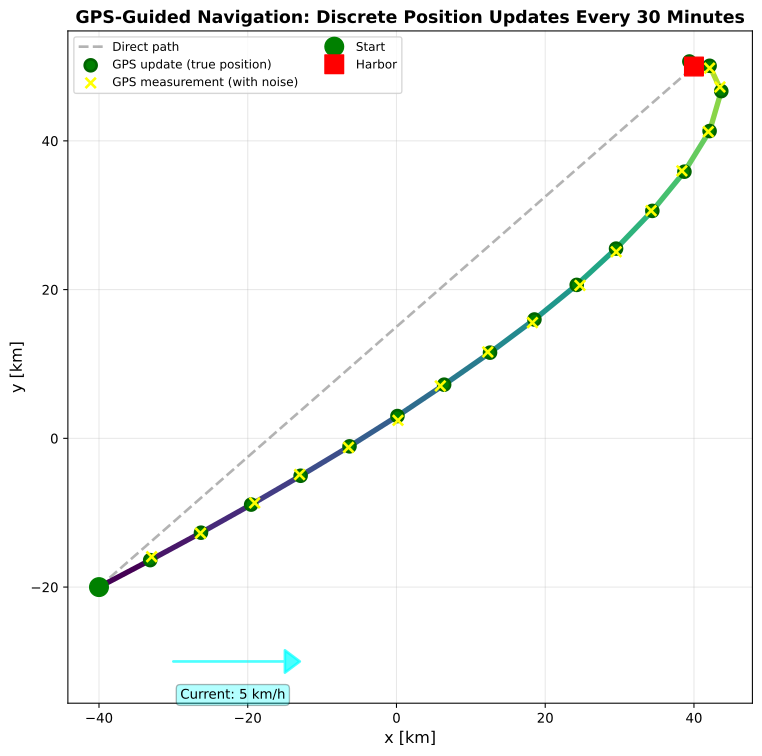
The visualizations reveal the fundamental characteristics of systems with delayed, discrete feedback:
Trajectory segments: The plot shows the boat’s path colored by GPS update cycles. Each colored segment represents navigation between consecutive GPS fixes. Notice how the trajectory has a “wandering” quality compared to Example 3’s smooth curve - this is the effect of operating without continuous position feedback. The green circles mark true positions when GPS updates occur, while yellow X marks show the noisy measurements the autopilot actually receives.
GPS measurement noise: Even small GPS errors (±0.3 km standard deviation) cause the autopilot to compute slightly incorrect directions, which persist over the 30-minute intervals between updates. This is why real navigation systems use sensor fusion techniques (e.g., Kalman filters) to smooth out measurement noise.
Comparing to Example 3: While Example 3’s continuous feedback produced a smooth, optimal trajectory, this GPS-based system navigates less efficiently:
- Longer path: The discrete updates cause the boat to maintain incorrect directions between fixes
- More vulnerable to drift: The 30-minute gaps between measurements allow significant current-induced position errors to accumulate
- Measurement noise effects: GPS errors at each update introduce additional trajectory deviations
Why iteration is essential: This problem has two interacting time scales that make analytical solution impossible:
- Fine time scale (\(\Delta t = 0.05\) hours): Position updates due to velocity
- Coarse time scale (GPS updates every 0.5 hours): Discrete feedback events that update the direction
The interplay between continuous drift and discrete direction updates creates a complex dynamical system. Only by stepping forward in time, checking for GPS updates at each step, and applying the appropriate rules can we simulate realistic behavior.
Computational thinking insight: This example demonstrates how iteration handles event-driven systems where different things happen at different times. The algorithm checks conditions (if t_gps >= gps_update_interval) and applies different rules depending on state. This is precisely how real embedded systems work - a continuous loop checking sensors and updating actuators, with higher-level decisions occurring at slower rates. The iterative approach naturally captures this multi-rate, event-driven behavior that would be intractable to analyze symbolically.
Animated Trajectory: GPS Updates in Real-Time
Watch the simulation unfold as GPS updates arrive every 30 minutes, causing discrete changes in the boat’s navigation strategy.
Code
from matplotlib.animation import FuncAnimation
from IPython.display import HTML
import matplotlib
matplotlib.rcParams['animation.embed_limit'] = 50
# Select frames (50 total for compatibility)
frame_skip = max(1, len(trajectory) // 50)
frame_indices = list(range(0, len(trajectory), frame_skip))
def animate_gps_trajectory(frame_idx):
"""Animation showing GPS-guided navigation"""
ax.clear()
i = frame_indices[frame_idx]
current_pos = trajectory[i]
current_time = times[i]
current_direction = directions[i]
# Plot the desired straight-line path
ax.plot([P_start[0], P_harbor[0]], [P_start[1], P_harbor[1]],
'k--', linewidth=2, alpha=0.3, label='Direct path', zorder=1)
# Plot trajectory so far
ax.plot(trajectory[:i, 0], trajectory[:i, 1],
'b-', linewidth=2, alpha=1, zorder=2)
# Current boat position
ax.plot(current_pos[0], current_pos[1], 'bo', markersize=12,
markeredgecolor='darkblue', markeredgewidth=2, zorder=6)
# Draw direction vector
direction_length = 8
direction_end = current_pos + direction_length * current_direction
ax.arrow(current_pos[0], current_pos[1],
direction_end[0] - current_pos[0], direction_end[1] - current_pos[1],
head_width=2.5, head_length=2, fc='red', ec='darkred',
linewidth=2, zorder=7, alpha=0.8)
# Show GPS update points that have occurred
gps_updates_so_far = [t for t in gps_update_times if t <= current_time]
for j, gps_t in enumerate(gps_updates_so_far):
idx = np.argmin(np.abs(times - gps_t))
if idx < len(trajectory):
ax.plot(trajectory[idx, 0], trajectory[idx, 1],
'go', markersize=10, markeredgecolor='darkgreen',
markeredgewidth=2, zorder=5, alpha=0.7)
# Show measured position if it exists
if j < len(measured_positions):
ax.plot(measured_positions[j, 0], measured_positions[j, 1],
'yx', markersize=8, markeredgewidth=2, zorder=5)
# Highlight if GPS update just happened
if len(gps_updates_so_far) > 0:
# Determine how long ago the very last update was
last_update_time = gps_updates_so_far[-1]
time_since_last_update = current_time - last_update_time
# If it happened within the last 0.1 hours (6 mins), highlight the measurement
if 0 <= time_since_last_update < 0.1:
latest_idx = len(gps_updates_so_far) - 1
# GET THE MEASURED POSITION, NOT THE TRUE POSITION
if latest_idx < len(measured_positions):
m_pos = measured_positions[latest_idx]
# Draw circle around the yellow 'x' (the measurement)
circle = plt.Circle((m_pos[0], m_pos[1]), 5, color='green', fill=False,
linewidth=3, linestyle='--', alpha=0.5, zorder=4)
ax.add_patch(circle)
# Position text near the yellow 'x'
ax.text(m_pos[0], m_pos[1] + 8, 'GPS UPDATE!',
fontsize=11, ha='center', fontweight='bold',
bbox=dict(boxstyle='round,pad=0.5', facecolor='lightgreen', alpha=0.8))
# Mark start and harbor
ax.plot(P_start[0], P_start[1], 'go', markersize=12, label='Start', zorder=4, alpha=0.7)
ax.plot(P_harbor[0], P_harbor[1], 'rs', markersize=12, label='Harbor', zorder=4, alpha=0.7)
# Current indicator
ax.arrow(-30, -30, 15, 0, head_width=3, head_length=2,
fc='cyan', ec='cyan', alpha=0.5, linewidth=2, zorder=1)
ax.text(-22, -35, '5 km/h', fontsize=9, ha='center',
bbox=dict(boxstyle='round', facecolor='cyan', alpha=0.3))
# Set axis properties
ax.set_aspect('equal')
ax.grid(True, alpha=0.3)
ax.set_xlabel('x [km]', fontsize=11)
ax.set_ylabel('y [km]', fontsize=11)
ax.set_xlim(-45, 50)
ax.set_ylim(-40, 60)
# Information box
distance_to_harbor = np.linalg.norm(P_harbor - current_pos)
distance_traveled = np.sum(np.linalg.norm(np.diff(trajectory[:i+1], axis=0), axis=1)) if i > 0 else 0
time_since_update = time_since_last_update * 60 # Convert to minutes
textstr = f'Time: {current_time:.2f} hours ({current_time*60:.0f} min)\n'
textstr += f'Distance traveled: {distance_traveled:.1f} km\n'
textstr += f'Distance to harbor: {distance_to_harbor:.1f} km\n'
textstr += f'Time since GPS update: {time_since_update:.0f} min\n'
textstr += f'GPS updates so far: {len(gps_updates_so_far)}'
props = dict(boxstyle='round', facecolor='wheat', alpha=0.85)
ax.text(0.02, 0.98, textstr, transform=ax.transAxes, fontsize=10,
verticalalignment='top', bbox=props, family='monospace')
ax.set_title('GPS-Guided Navigation: Discrete Updates Every 30 Minutes',
fontsize=12, fontweight='bold')
if frame_idx == 0:
ax.legend(loc='lower right', fontsize=9)
# Create figure and axis
fig, ax = plt.subplots(figsize=(10, 8))
plt.close(fig)
# Create animation
anim = FuncAnimation(fig, animate_gps_trajectory, frames=len(frame_indices),
interval=100, repeat=True)
# Get HTML and wrap with responsive CSS
anim_html = anim.to_jshtml()
responsive_html = f"""
<div style="width: 100%; max-width: 100%; overflow: hidden;">
<style>
.animation-container {{
width: 100% !important;
max-width: 100% !important;
}}
.animation-container img {{
width: 100% !important;
height: auto !important;
}}
</style>
<div class="animation-container">
{anim_html}
</div>
</div>
"""
HTML(responsive_html)The animation vividly demonstrates the episodic nature of GPS-based navigation. Watch for the green circles that appear every 30 minutes - these mark GPS position fixes. When a GPS update occurs, a green dashed circle briefly highlights the boat’s position and “GPS UPDATE!” appears. At these moments, the autopilot recalculates the direction toward the harbor.
Between updates, the boat maintains its direction while drifting with the current - you can see the trajectory curve away from the direct path (black dashed line) during these periods. The red direction arrow shows which way the boat is steering, which updates instantly at each GPS fix. The yellow X markers show the noisy GPS measurements that differ slightly from the true positions (green circles), introducing small navigation errors.
This animation captures a fundamental principle in real-world control systems: perfect information is unavailable. Systems must operate with delayed, noisy, discrete measurements and make the best decisions possible given incomplete knowledge. The iterative simulation approach naturally handles this complexity - at each time step, we check what information is available, apply the appropriate rules, and update the state. This is exactly how embedded navigation systems work in practice.
References
[1]
Wing JM. Computational thinking. Communications of the ACM 2006;49:33–5. https://doi.org/10.1145/1118178.1118215.
[2]
Weintrop D, Beheshti E, Horn M, Orton K, Jona K, Harrell Sheldon L, et al. Defining computational thinking for mathematics and science classrooms. Journal of Science Education and Technology 2016;25:127–47. https://doi.org/10.1007/s10956-015-9581-5.
[3]
Burden RL, Faires JD, Burden AM. Numerical analysis. 10th ed. Cengage Learning; 2015.